Looks like me, or not
Same tool, same voice. The difference is how the first frame and the prompt are set up.
CJ Chan
Free guide · TWIN
The exact workflow behind the video: one photo, one cloned voice, and a prompt that keeps it looking like you. Enter your email to unlock all 7 steps and the prompt.
What the guide fixes
Two of the biggest jumps in quality come from the first frame and the edit.
Same tool, same voice. The difference is how the first frame and the prompt are set up.
The talking clip is the easy part. Captions, cards and motion are what make people keep watching.
The workflow
The details and the prompt are one step away. Enter your email at the top to unlock them.
Even light, facing the camera, relaxed face. Keep your glasses on if you wear them. You do not need multiple angles.
Use Seedream 5.5 and put your front photo in as the reference. Lock the lighting, background and outfit in this one image, because every clip will start from it.
Slightly darker lighting actually helps: it hides AI skin flaws. Zoom in and check the skin before you use the still.
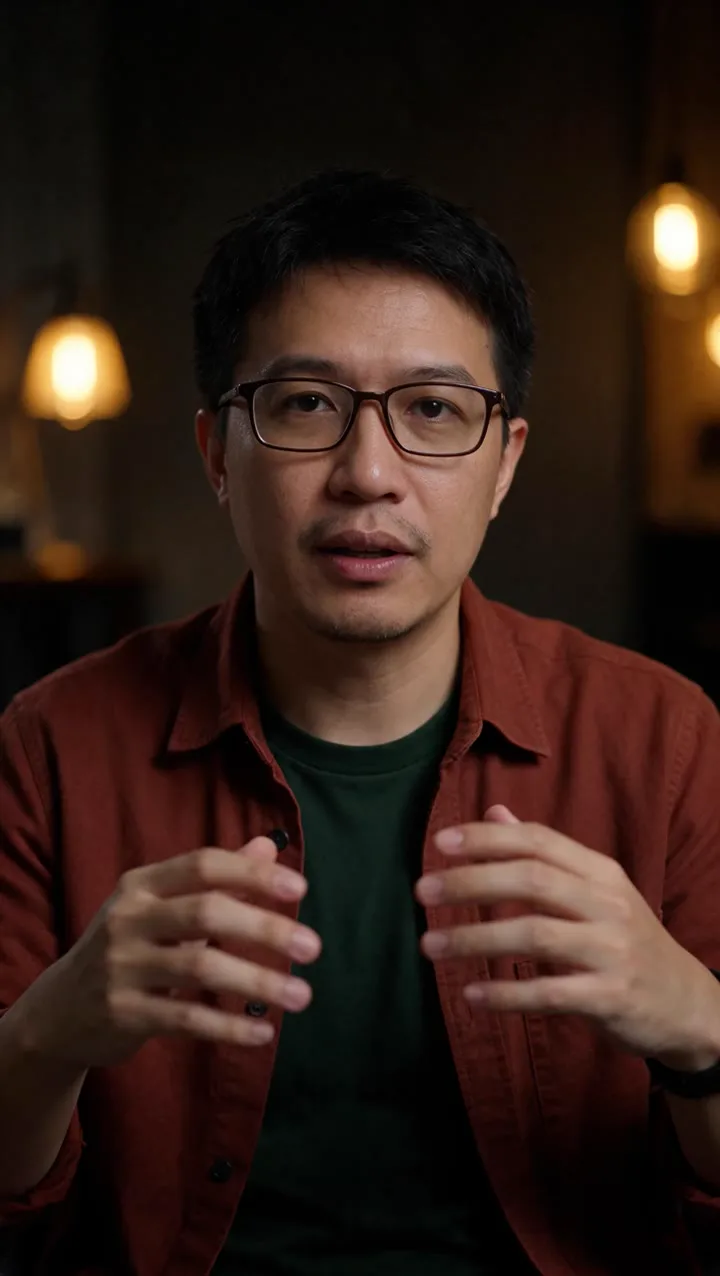
The still I used as the first frame.
After that you only type. Speed the voiceover up 1.2x so it sounds more natural on camera.
Cut where a sentence ends, so each clip finishes cleanly.
Give it only the first-frame still and that line’s voice clip. Do not add an element.
Mini has the best expressions. Fast has the cleanest skin. The full model looks most like you but costs more.
If you do not paste the line, Seedance re-says it in its own words and may change them. Copy this template and swap in your line:
Vertical medium close-up. The person in Image 1 talks straight to the camera in clear American English, energetic and natural, small hand gestures, small nods. Static camera. No text, no music, no other people.
Face, skin and lighting detail: follow Image 1 exactly.
Dialogue: speaks English only and says exactly these words from Audio 1: "<your line>", lips synced, same voice.
Keep the same person, outfit and room as Image 1 the whole time.
Talking is the easy part. Add captions, cards and animation, because that is what makes people watch to the end.
Region note: on Higgsfield, Seedance Mini and Fast show “not available in the US”. Check which models are available in your region before you plan around them.
Still stuck?
Tell me what you need: an AI twin, a talking video, or a full edit. I reply by email within 1 business day.